


Hey there!
Last time, we talked about how much data you need to set accurate natural process limits. Today, we’re diving into an equally important topic: When should you change those limits as new data comes in?
Let’s say you’ve collected enough data to establish a solid baseline, and your process limits are doing a great job of putting a finger on the pulse of your work. But what happens when a new signal is detected?
When Should You Update Your Process Limits?
Once you detect a signal in your process, you need to take action. And with that action, your process will change.
Whether it’s introducing a new work management practice, a change in policies, or a restructuring of your team’s board design—these updates make your old data irrelevant as it no longer represents your current conditions. This is the exact time to reconsider your limits.
It’s that simple, if you change your process, you’ll need to collect new data and update your limits that represent that new process.
However, here’s an important tip:
When you detect a signal, you have to freeze your limits while you gather new data. Remember, we need at least 3 data points to calculate the limits.
So, stick to the existing limits until you’ve collected at least three new work items. Then, use those new items to calculate your new baseline.
Once you’ve collected at least three new data points, it’s time to build your updated baseline. Keep collecting data until you have enough points (between 10 to 20, with 20 being the ideal number) to set your new process limits unless you detect a new signal. Then go through the same process again.
Try It Out With Your Own Data!
Ready to see this in action? Our Process Improvement Dashboard uses this exact approach to help you stay on top of your flow metrics.
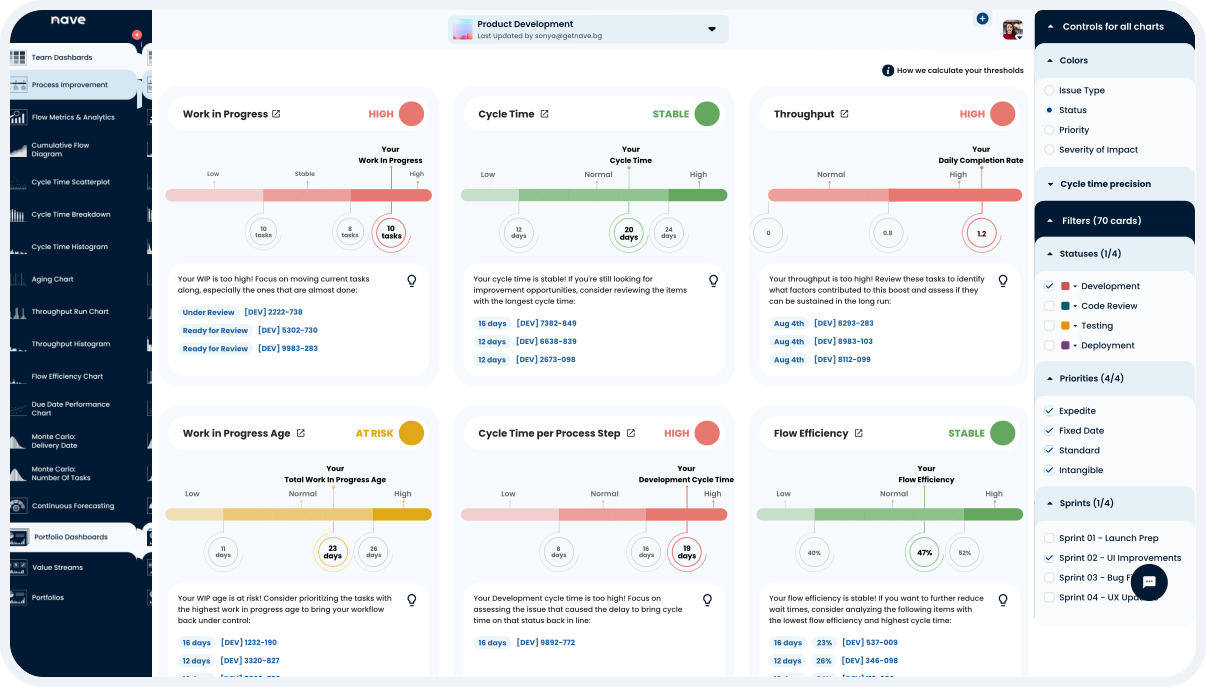
Here is how it works:
Your thresholds are set by analyzing a time-ordered sequence of data, using 20 data points by default.
To flag a low or high status for your flow metrics, we look for a significant deviation from your typical process behavior (aka a signal).
When a signal is detected, the benchmarks are frozen, and no new data points are included. Once new data points are available, they are used to establish a new baseline.
The Process Improvement dashboard automatically flags signals and freezes your limits when needed all while providing actionable insights on how to get back on track.
The best part? The dashboard doesn’t just tell you where your metrics are falling short; it also offers clear action items to help you improve.
Give it a go with your own data—it’s free for 14 days, no strings attached.
Next week, we’ll dive into other indicators that can signal process issues. Spoiler: limits aren’t the only thing you need to watch for. Stay tuned!
Thanks for reading, and I’ll see you next Thursday, same time and place for more managerial insights!
Bye for now!
Source: Vacanti, D. “Actionable Agile Metrics for Predictability Volume II”
