


In many enterprise environments, introducing new tools like Nave can be a slow and complex process. Security assessments, vendor approvals, procurement hoops, it can take six to twelve months before you’re even allowed to connect a new platform to your data.
But what if you could avoid that delay completely and start seeing results today without compromising your company policies?
The fastest and easiest way forward is, of course, to connect Nave directly to your system. But if that is not an option from the start, here is the next best one.
In this article, I’ll walk you through a community-built solution by Amanda Varella, a long-time Nave champion, who created a simple yet powerful tool to anonymize your data from Jira and upload it to Nave, all while your approval processes run in parallel.
Let’s dive in.
Why This Solution Exists
Amanda strongly believed in Nave’s ability to transform her teams’ forecasting and delivery performance, but the companies she worked for (like Canva, Envato, Vista, and 99designs), had strict enterprise-grade security practices.
 | Amanda VarellaEngineering Manager at Envato"We needed to show the value of Nave to the business, but we couldn’t even connect Jira without months of paperwork." |
So she found a way to upload data securely, using a simple file exporter, a masking script, and Nave’s API.
That process has now evolved into an automated open-source tool that you can use today.
Before you start, here is what you need:
- A Jira API key
- A Nave API key
- Access to a code editor like Cursor (optional, but helpful)
In essence, here is what the solution does:
- It exports your data from Jira in a JSON format
- Then, it replaces all email addresses with fake ones, masks all URLs with randomised placeholders, and replaces content of fields like “name”, “goal”, “body”, “summary”, and “description” with randomised text
- Finally, it uploads the data to the Nave API in the required format
Essentially, this solution lets you create a dashboard and analyze your workflow by uploading only your IDs and timestamps. Everything else is anonymized, so none of your business data is exposed.
| | Amanda VarellaEngineering Manager at Envato"Even before we had security approvals, I was able to start using Nave in a compliant way by removing all identifiable information." |
This means you can test and demonstrate value with zero risk to company data starting from day one.
Step-by-Step Set Up of File Uploader
1. Clone the GitHub Repository
Here is how to make this work.
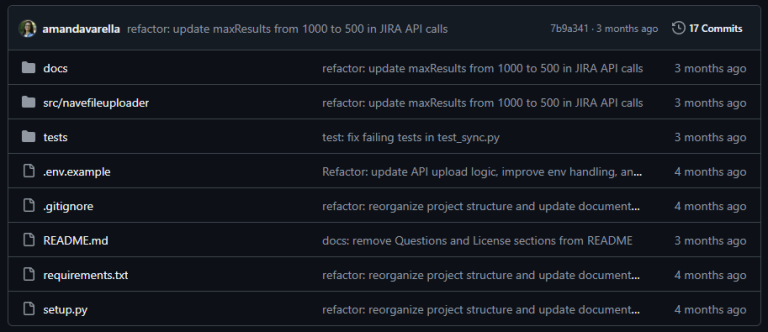
Visit Amanda’s repo: https://github.com/amandavarella/navefileuploader
Here you’ll find the source code, setup instructions, and explanations of how masking works.
2. Install and Configure the Tool
You can run the project using an AI-assisted code editor like Cursor or VS Code. In the README, you’ll find:
- How to install dependencies
- How to input your Jira and Nave API keys
- Instructions to run the script manually
The script will prompt you to:
- Download JSON from Jira
- Mask all personally identifiable and sensitive data
- Upload the cleaned file directly to Nave
3. Run the Script
To run the sync process, just type: Nave-sync
In less than a minute, the tool will:
- Connect to your Jira board
- Export and clean your data
- Upload it to Nave using the API
Your Nave dashboards will update automatically with the latest (anonymised) data.
Why This Works
This approach gives you a safe, secure way to build a business case for Nave from day one.
- Security compliant – No direct integration, no sensitive data
- Fast results – Get analytics from Nave instantly
- Open-source – Use, fork, or adapt freely
You don’t need to be a software engineer to use that solution. Give it a try now.
And if you stumble upon any issues, my team would be happy to help. Just contact us at hello@getnave.com and we’ll take it from there!
The process runs within your own environment. No sensitive data leaves your network.
Amanda is a power user who wanted to get results faster and found a way to do it.
“I just wanted to solve my own problem, and it turned out to be useful for others too.”
If you’re looking to do the same, try the uploader today and start delivering value without delay.
I hope this guide is helpful. See you next week, same time and place for more managerial insights! Bye for now.
